Reaching out to a recruiter on LinkedIn can feel intimidating, like cold-calling in a sea of notifications – but done right, it’s one of the fastest ways to land interviews.
If you’re job hunting, knowing how to reach out to a recruiter on LinkedIn can give you a huge advantage.
Instead of waiting for opportunities, you can start conversations directly with recruiters and get your profile noticed faster.
I’ve coached dozens of friends through job hunts, and the ones who get replies treat it like a quick, value-packed intro: short, specific, and human.
But here’s the problem: most people either don’t message recruiters at all, or they send messages that get ignored.
In this guide, you’ll learn exactly how to message a recruiter on LinkedIn in a way that feels natural, professional, and actually gets replies.
Why Messaging Recruiters Actually Works
Before we get into the how, let’s talk about why this matters.
When you message a recruiter, you’re doing something most applicants won’t: showing initiative.
Recruiters appreciate candidates who make their job easier – not harder.
By reaching out thoughtfully, you:
- Stand out from the crowd of applicants who only click “Apply.”
- Show genuine interest in the company and role
- Create a human connection before the formal review process
- Get on their radar for future openings, even if this one isn’t right
One recruiter put it simply: “Messaging a recruiter on LinkedIn isn’t desperate. It’s smart. You’re not being annoying. You’re being brave. And that already sets you apart.”
Step 1: Prepare Your Profile Before You Reach Out
Here’s a hard truth: before you message any recruiter, they’re going to click your profile. What will they find?
Your LinkedIn profile is your digital first impression. If it doesn’t tell your story clearly, recruiters may overlook you – even if you have the right skills.
Before sending a single message, run through this checklist:
- Professional photo – Profiles with photos get up to 21x more views. No selfies, no group shots – just a clear, friendly headshot.
- Strong headline – Don’t just list your current job title. Add keywords recruiters might search for. Example: “Marketing Analyst | Data-Driven Storyteller | Open to Growth Opportunities”.
- Keyword-rich summary – Use 3-5 short paragraphs explaining your expertise, highlighting achievements, and sharing what you’re seeking.
- Skills section – Add at least 10-15 relevant skills. Recruiters filter by these.
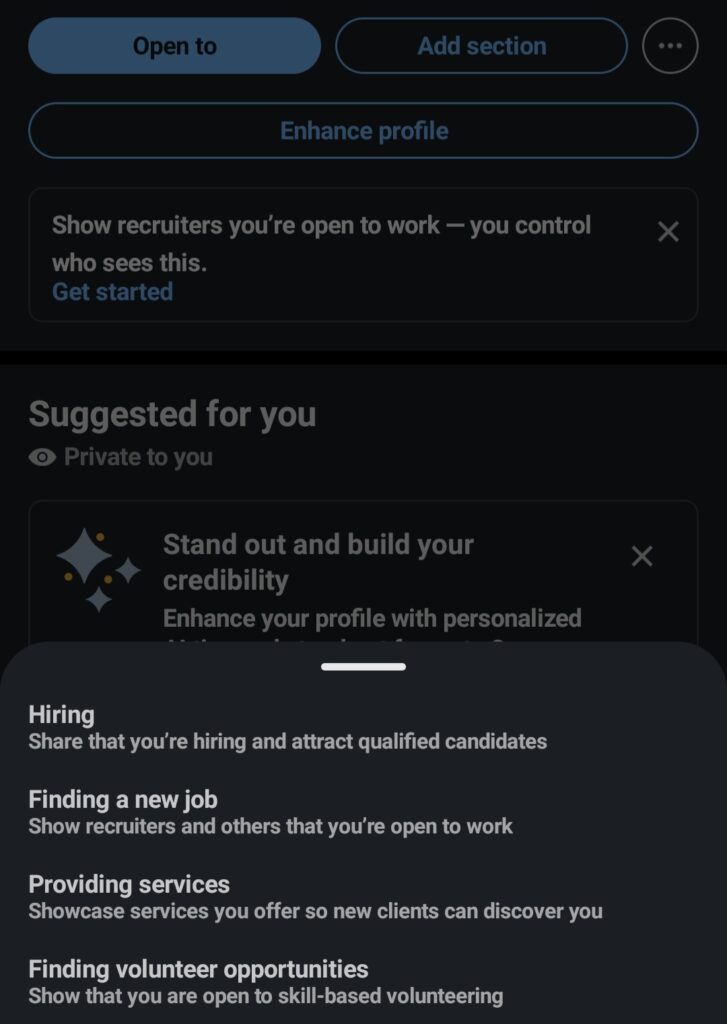
- “Open to Work” setting – Turn this on. You can choose whether only recruiters or all LinkedIn members see it
Review job descriptions in your field and incorporate the language recruiters use. The right keywords help your profile show up in their searches.
If they’re searching for “project manager with Agile experience” and those words appear in your profile, you’ll surface in their results.
Step 2: Find the Right Recruiters to Connect With
Not every recruiter is worth your time. If you’re in marketing but connect with a recruiter who only hires engineers, you’re wasting everyone’s effort.
Focus on quality over quantity – aim for 10-15 recruiters who specialize in your role or industry.
Use LinkedIn’s search bar strategically :
- Type phrases like “Recruiter Marketing,” “Recruiter Finance,” or “Tech Recruiter”
- Add location filters if you’re focused on specific cities
- Use the “People” filter to see actual profiles
Check job postings :
- Often, the recruiter’s name appears right in the listing
- That’s an easy starting point – they posted it, they’re clearly hiring
Target specific companies :
- If you have a dream company, search “Recruiter + [Company Name]”
- Visit the company’s LinkedIn page and browse the “People” section
- Look for talent acquisition partners or HR professionals
Find active recruiters with this search trick :
- Type your ideal job title in the search bar, add the word “AND,” then type “hiring” in quotes
- Example: “marketing manager” AND “hiring“
- Then filter by “Posts” to see who’s actively posting about hiring for your role
- This shows you recruiters who are hiring right now, not six months ago
Step 3: The Right Way to Send a Connection Request
When you find a recruiter you want to connect with, never send a blank connection request.
Recruiters get dozens of requests daily – a generic “I’d like to connect” will get ignored.
Instead, add a short, warm note. Keep it to 2-3 sentences. The goal is to open a door, not to ask for a job in the first message.
Connection Request Templates
Approach 1: Compliment their work
"Hi [Name], I've noticed the roles you've been hiring for in [industry] and really admire your updates on LinkedIn. I'd love to connect."Approach 2: Mention shared interests
"Hi [Name], I see you focus on recruiting in [field]. As I'm building my career in [field], I'd appreciate the chance to connect."Approach 3: Be clear but not pushy
"Hi [Name], I came across your profile and noticed you work in [Industry/Field]. I'd love to connect and stay updated on any opportunities that align with my background."Approach 4: Reference specific work
"Hi [Name], I came across your profile and loved your work in [X]. I'm trying to learn more about [industry/role] and would really value any insight you're open to sharing."The key is personalization. Mention something specific about their profile, their posts, or their company to show you’re not just adding recruiters at random.
Step 4: The Game-Changing Follow-Up (Most People Miss This)
Here’s where most job seekers fail. They send a connection request, it gets accepted, and they think the job is done.
But recruiters are flooded with connection requests – they often won’t have time to respond to every one.
The game changer? Send another message.
This follow-up message is short, sweet, and simple. Send it within 24-48 hours after they accept your connection.
It’s your chance to thank them, reintroduce yourself, and politely mention your interest.
Follow-Up Message Templates
For general networking:
"Hi [Name], thanks for connecting! I see you focus on hiring for [industry/roles]. I'm currently exploring opportunities as a [specific role] and would love to stay on your radar. If you have any advice or upcoming roles that might fit, I'd really appreciate it."Hi [Name],
I hope you’re doing well. I’m a [your role] with experience in [key skills], and I came across your profile while exploring opportunities in this field.
I’d love to connect and learn more about any relevant roles you may be hiring for.
Thanks for your time, and I look forward to hearing from you.If you’ve applied to a specific job:
"Thanks for connecting! I recently applied for the [Job Title] position at [Company] and wanted to introduce myself. I have experience in [key skill/area] and would love the opportunity to speak with you about how I might contribute to the team."If they posted the role:
"Hi [Name], I just applied for the [Job Title] role you posted. I'm really excited about the team's work in [X area]. Happy to share more context—just wanted to introduce myself!"Hi [Name],
I recently saw the [Job Title] role at [Company], and I’m very interested. I have experience in [relevant skills], and I believe my background aligns well with the position.
I’d appreciate the opportunity to connect and learn more about the role.
Thank you for your time.If you want to reference a conversation or post:
"Hi [Name], thanks again for talking with me last month. I came across the [Job Title] position at [Company] and submitted my application immediately. This role is a great fit with my background in [skills]. Please let me know the best way to express my strong interest."This simple two-step process – connection request THEN follow-up – helps them remember your name when they’re reviewing applications.
Step 5: Engage Before You Ask (Optional but Powerful)
If you really want to build a relationship, don’t just message and disappear.
Networking works best when it feels like a relationship, not a transaction.
Before you send your follow-up, or even before you connect, try these engagement strategies:
- Comment on their posts: Go beyond “Great post!” Add thoughtful input like, “I’ve seen this trend in my own work too – especially with X tool.”
- Share relevant content: If you read an article on hiring trends, post it with your perspective. Recruiters notice people who add value.
- Congratulate them: A quick “Congrats on your new role!” message shows you’re paying attention without expecting anything in return.
Even small interactions add up. If a recruiter sees your name pop up multiple times, they’ll be much more receptive when you finally reach out.
Proven Message Templates (Copy, Tweak, Send)
Here are complete templates you can adapt. Remember to personalize each one before sending.
When You’ve Applied to a Specific Job
Hi [Recruiter's name],

I came across your profile while researching [Company name] and noticed the [Job title] opening. I just applied for the role and wanted to introduce myself. I'm really interested in this position and believe my background in [Your field] could be a great fit for your team.

I'd love to connect to learn more about the company's culture and any additional insights you can offer about the position.

Thank you,
[Your name]When You’re Open to Roles But Don’t See a Specific Opening
Hi [Name],

I'm currently exploring new roles in [industry/type], ideally focused on [area]. I admire how your team approaches [something specific if possible], and I'd love to stay in touch if something aligned opens up.

Thanks for connecting!
[Your name]When You’re Seeking Industry Insights (Early Career or Career Change)
Hi [Recruiter's name],

I'm currently exploring opportunities in [Industry] and was struck by your expertise in recruiting top talent for [Company name]. I'm especially interested in learning more about what companies in this field are looking for in candidates.

If you're open to it, I'd appreciate any advice you might have on making a strong impression in this industry.

Best regards,
[Your name]
Hi [Name],
I’m currently starting my career in [industry] and am actively looking for opportunities to grow. I noticed you recruit in this field and wanted to connect.
I’d really appreciate any advice or information on entry-level roles you might have.
Thank you!When You’ve Had an Informational Interview
Dear [Name],

Thanks again for talking with me last month. I came across the [Job Title] position at [Company], and I submitted my application immediately. This role is a great fit with my background in [skills].

Please let me know the best way to go about this process and express my strong interest in this role and your organization.

Sincerely,
[Your name]When You Found Them Through a Hiring Post
Hi [Name],

So great to connect! I saw your post about the [Job Title] role and wanted to reach out as I applied to the position. Here's the requisition # for reference: [insert job ID # if available].

I'm a [Current Role] with [#] years of experience in [field], including work at [Company 1] and [Company 2]. I'm very interested in being a part of the team at [Company] and have solved [X challenge mentioned in job description].

Happy to send over my resume if helpful. Thanks so much!Common Mistakes That Get You Ignored
After years of watching what works and what doesn’t, here are the pitfalls to avoid:
Don’ts ❌
- Don’t ask for a job in the first message – The goal is to open a door, not demand entry.
- Don’t send your resume immediately – Let the conversation breathe. Once they reply or show interest, then share your resume.
- Don’t write a novel – Keep messages short, clear, and personal. Recruiters are busy.
- Don’t send generic messages – “Hi, I’d love to connect!” with no context gets ignored.
- Don’t spam – Don’t send your resume repeatedly, send memes, or bombard them with messages.
- Don’t get discouraged by no response – Recruiters are busy. No response doesn’t mean they didn’t appreciate your message.
Do’s ✅
- Do personalize every message – Mention something specific about their profile, posts, or company.
- Do keep it professional but friendly – Be personable without being overly casual.
- Do time your messages thoughtfully – Send early in the week (Monday/Tuesday) rather than Friday when messages get buried.
- Do follow up once – One polite follow-up is smart. More than that is annoying.
- Do be specific about what you want – Not “anything in marketing,” but “remote content strategist roles in tech”.
Managing Expectations: The Reality of Responses
Let’s be real for a moment. Not every recruiter will respond. Their inboxes are inundated with hundreds of messages.
Some will tell you to apply through official channels. Some will simply ignore you. This doesn’t mean you did anything wrong – it means they’re busy.
But here’s what happens when you do it right: out of several outreach attempts, you might get one coffee chat, one piece of useful feedback, and one person who remembers your name when a role opens up.
That’s enough. That’s the goal.
The recruiters who do respond – the ones who see candidate experience as an extension of their brand – are the ones worth building relationships with anyway.
When Is the Best Time to Message Recruiters?
Timing can make a difference.
Best times:
- weekdays (Tuesday–Thursday)
- morning hours (8 AM – 11 AM)
Avoid weekends unless the recruiter is active.
FAQs
Conclusion
Learning how to reach out to a recruiter on LinkedIn is a powerful skill that can speed up your job search.
The key is simple:
- Keep your message short
- Be clear about your goals
- show your value
- stay professional
Once you understand how to message a recruiter on LinkedIn, you’ll stand out from most candidates who either don’t reach out or do it the wrong way.
So update your profile, find 10-15 relevant recruiters, and send those connection requests.
The worst that happens is no response. The best that happens? You land an interview for a role that never even got posted publicly.

1 thought on “How to Reach Out to a Recruiter on LinkedIn”